Python minidom ja urllib
Tutkitaan, miten Pythonilla voidaan hyödyntää DOM-rajapintaa, ulkopuolisia verkkopalveluita ja tehdään oma DOM-pohjainen template. Huom. tämä on Python2:lla tehty versio.
xml.dom
xml.dom rajapinta Python:ssa toimii hyvin samaan tapaan kuin Javascriptissäkin. Voi käyttää myös kevyempää xml.dom.minidom-rajapintaa.
Tarkastellaan esimerkkien kautta, miten DOM:ia voidaan hyödyntää web2py-sovelluksessa. Sama tapa toimii myös users.jyu.fi:ssä CGI- ja flask-sovelluksissa.
CGI-versio
#!/usr/bin/python
# -*- coding: UTF-8 -*-

import cgi
import cgitb;
cgitb.enable();
import sys
sys.stderr = sys.stdout
from xml.dom.minidom import getDOMImplementation, parse, parseString
import os
import urllib

print """Content-type: text/html; charset=UTF-8

"""

impl = getDOMImplementation()
# createDocument(nimiavaruus, juurielementti, dokumenttityyppi)

doc = impl.createDocument("http://www.w3.org/1999/xhtml", "table", None)
# pakko laittaa seuraava, koska jostakin syystä edellinen ei riitä

doc.documentElement.setAttribute("xmlns", "http://www.w3.org/1999/xhtml")

try:
  doc2 = parse( urllib.urlopen("http://www.hs.fi/uutiset/rss/"))
except Exception as e:
  print "urllib hajosi: " + str(e)

for node in doc2.getElementsByTagName("item"):
    tr = doc.createElement("tr");
    td = doc.createElement("td");
    tr.appendChild(td);
    td.appendChild( doc.importNode( node.getElementsByTagName("title").item(0).firstChild,1));
    td = doc.createElement("td");
    tr.appendChild(td);
    td.appendChild( doc.importNode( node.getElementsByTagName("link").item(0).firstChild,1));
    td = doc.createElement("td");
    tr.appendChild(td);
    td.appendChild( doc.importNode( node.getElementsByTagName("category").item(0).firstChild,1));
    doc.documentElement.appendChild(tr);
print doc.toxml('UTF-8')
Flask-versio
#!/usr/bin/python
# -*- coding: utf-8 -*-

from flask import Flask
app = Flask(__name__)

from flask import render_template
from flask import request
from flask import session, redirect, url_for, escape
from xml.dom.minidom import getDOMImplementation, parse, parseString
import os
import urllib


@app.route('/')
def hello_world():
        impl = getDOMImplementation()
# createDocument(nimiavaruus, juurielementti, dokumenttityyppi)
        doc = impl.createDocument("http://www.w3.org/1999/xhtml", "table", None)
# pakko laittaa seuraava, koska jostakin syystä edellinen ei riitä
        doc.documentElement.setAttribute("xmlns", "http://www.w3.org/1999/xhtml")
        try:
          doc2 = parse( urllib.urlopen("http://www.hs.fi/uutiset/rss/"))
        except Exception as e:
          return "urllib hajosi: " + str(e)

        for node in doc2.getElementsByTagName("item"):
                tr = doc.createElement("tr");
                td = doc.createElement("td");
                tr.appendChild(td);
                td.appendChild( doc.importNode( node.getElementsByTagName("title").item(0).firstChild,1));
                td = doc.createElement("td");
                tr.appendChild(td);
                td.appendChild( doc.importNode( node.getElementsByTagName("link").item(0).firstChild,1));
                td = doc.createElement("td");
                tr.appendChild(td);
                td.appendChild( doc.importNode( node.getElementsByTagName("category").item(0).firstChild,1));
                doc.documentElement.appendChild(tr);
        return doc.toxml('UTF-8')

if __name__ == '__main__':
    app.debug = True
    app.run(debug=True)
web2py-versio
from xml.dom.minidom import getDOMImplementation, parse, parseString
import os
import urllib

def hae_tiedot():
    impl = getDOMImplementation()
    # createDocument(nimiavaruus, juurielementti, dokumenttityyppi)
    doc = impl.createDocument("http://www.w3.org/1999/xhtml", "table", None)
    # pakko laittaa seuraava, koska jostakin syystä edellinen ei riitä
    doc.documentElement.setAttribute("xmlns", "http://www.w3.org/1999/xhtml")

    try:
      doc2 = parse( urllib.urlopen("http://www.hs.fi/uutiset/rss/"))
    except Exception as e:
      print "urllib hajosi: " + str(e)

    for node in doc2.getElementsByTagName("item"):
        tr = doc.createElement("tr");
        td = doc.createElement("td");
        tr.appendChild(td);
        td.appendChild( doc.importNode( node.getElementsByTagName("title").item(0).firstChild,1));
        td = doc.createElement("td");
        tr.appendChild(td);
        td.appendChild( doc.importNode( node.getElementsByTagName("link").item(0).firstChild,1));
        td = doc.createElement("td");
        tr.appendChild(td);
        td.appendChild( doc.importNode( node.getElementsByTagName("category").item(0).firstChild,1));
        doc.documentElement.appendChild(tr);

# seuraava ei toimi...
#       doc2 = parse( urllib.urlopen("http://www.fmi.fi/"))
# seuraava toimii eli ajetaan tidyn kautta
# tehokkaampaa olisi jos ajaisi tidya suoraan python-kirjastona
# mutta ei löydy valmiiksi asennettuna kaikista ympäristöistä
    url = "http://www.fmi.fi"
    doc3 = parse( urllib.urlopen("http://cgi.w3.org/cgi-bin/tidy?docAddr=http%3A%2F%2Fwww.fmi.fi%2F&forceXML=on"))
    for ul in doc3.getElementsByTagName("ul"):
            if ul.getAttribute("class") == "current-announcements-list":
                for a in ul.getElementsByTagName("a"):
                    tr = doc.createElement("tr");
                    td = doc.createElement("td");
                    tr.appendChild(td);
                    // tehdään suhteellisesta osoitteessa absoluuttinen
                    a.setAttribute("href", url + a.getAttribute("href"))
                    try:
                      td.appendChild( doc.importNode( a,1) );
                    except:
                      pass
                    doc.documentElement.appendChild(tr)
                break


    return dict(msg=doc.toxml('UTF-8'))
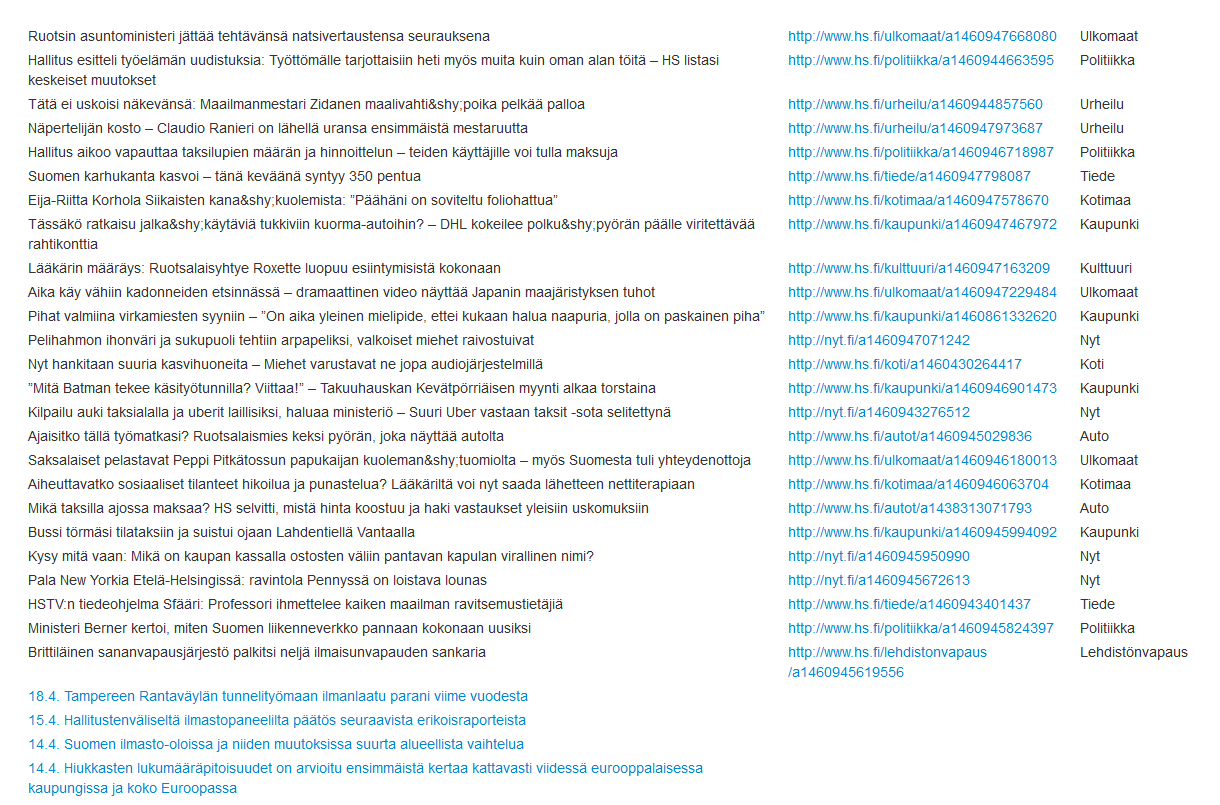
Sovellus tuottaa seuraavanlaisen sivun:
Käyttäjien kommentit