Exercise 1 - Get to know of Windows 95/NT surroundings
Exersice 1 contains two (2) parts. In first part you get familiar with
different parts of Windows. In the second part you practise some
basic operations. If you can handle all points in the first part, you can go directly
to second part.
Get to know of Windows operating system
- Check that computer has power on. If there are some lights on computer´s
front panel; the computer is on. Check that monitor has power on.
If there are some lights on monitor´s front panel; the monitor is on.
If both devices are on but there is no picture on monitor, press
space bar on keyboard and wait a moment. Computer may have power-saving
function on. So it seems that computer is shut down but it wakes up when
some bar is pressed.
- If devices are shut down, start computer by pressing power switch on
front panel. Put power on also to monitor. Computer makes needed functions
to start operating system automatically after power on.
Wait that window will emerge on screen and it asks to press key
combination CTRL-ALT-DEL. When you press,
all buttons must be on bottom at the same time. Log in -window will
emerge on screen and you can log in. Make sure that
you try to lock in on AGORANET !!!
- When you are logged in and there´s no windows blinking, you can start
to get familiar with desk top. Practise mouse movements and move icons
from one place to another.
You can catch icon when mouse is on it and you press left mouse
button to bottom. Icon moves along when the mouse is moving and after releasing
mouse button the icon stays it´s new location on desk top. You can get to know of all programs just
double-clicking their icons. Opened windows can be closed from cross on the
top right corner. Check also Start-menu on the bottom of
a desk top. If task bar isn´t showed move mouse to the bottom of the
screen.
- Next get to know of some utility programs of Windows. You can find
Paint-program icon with following way: Select from Start (finn. Käynnistä)
-menu Programs/Accessories (finn. Ohjelmat/Apuohjelmat)
-menu and from there Paint-program. Try to draw some picture with
program, for examble your own picture. Save picture named as kuva1.bmp
to directory below C:\MyTemp\own name. Saving can be
done by selecting menu File (finn. Tiedosto) and there
with command Save (finn. Tallenna). New directory can be
created with Save-window´s button Create New Folder
(finn. Tee uusi hakemisto). Notice that picture should be saved with
smaller amount of colors than it is supposed. Size of picture decreases a lot.
Select 256 or 16 color bitmap from point
Save As Type (finn. Tallennustyyppi). Look program´s menu and try to figure what kind of
operations they contain.
- Next get to know of Calculator- (finn. Laskin-) program. It is found below
the same menu than earlier Paint-program. Try to calculate some aritmethic
operations by giving inputs with keyboard and mouse. Try calculator
alternatives found below the View/Scientific
(finn. Näytä/Tieteellinen)-menu.
-
Try out different kinds of characters from keyboard. Start Wordpad-program
from same menu than earlier programs. Wordpad is a simple text-editor and you
can try to find following characters from the keyboard.
) / \ " # $ % & : , ; < | ' * + ( - @ _ [ ¤ §
- Some characters found from keyboard are so called accent-characters and which
are usually connected to other characters. First write accent and
after that the letter on which accent-mark is wanted to add. If accent-mark
is wanted as such it can be added with space character. Try to write following
line. Some characters might be impossible in some computers.
´ á é í ó ú `
à è ì ò ù â ê
î ô û ¨ ä ë ï ö ü
ÿ ~ ã õ ñ
- If you haven´t closed programs there should be three (3) different
programs open on desktop. Try to change active program from one to another with following ways.
Try to change by using taskbar and click program´s icon from there. Try also
key combination ALT-TAB. First press ALT-button
to bottom and then press TAB-button upon that program´s
icon which you want to activate. Don´t hold TAB-button on
bottom, just press it sequentially. When right icon is selected, releasing
ALT-button will activate selected program.
- Try changing size of windows. It is possible to change size of window when mouse pointer
change into two head-arrow on the edge of window. After that press left mouse
button and start to move mouse. The pointer will change into arrow when the edge
of window is near enough. Try to minimize window size by line-button
on top right corner. Minimized window can be emerged again when you click program´s
icon on task bar. Try also to change size by using square-button (middle) on
window´s top right corner. Notice that button will change when you press it.
- Try to play some game found from Windows. Games can be found from
Programs/Assessories/Games (finn. Ohjelmat/Apuohjelmat/Pelit)
-menu from Start (finn. Käynnistä)-menu. Games
might not work on computers in exercise-class rooms :) Then you can play
games on your home computer.
- At the end of working shut down all programs and look that there are no
programs shown on taskbar.
- If you end working log off from computer by selecting Start/Shut
Down/Log off USER ID (finn. Käynnistä/Sammuta/Kirjaa ulos
TUNNUS). Last point on Windows NT is
Close All Programs and log on as a different user?
(finn. Sulje kaikki ohjelmat ja kirjaudu eri käyttäjänä).
IT IS NOT ALLOWED TO SHUT DOWN THE COMPUTER!
Working on Windows surroundings
With following tasks you can get to know of most important tools of Windows
surroundings.
How to use clipboard
- Log in to computer by your user ID.
- Start Paint-program and draw a picture. Save picture to directory
C:\MyTemp\Ownname\ and use name which you can also remember
later. New directory can be created by using button Create New Folder
(finn. Tee uusi hakemisto) in Save-window. Remember to check amount
of colors and minimize it to 16 or 256! Minimize Paint-window so it´s title emerges
only in taskbar.
- Start Wordpad-program alongside the Paint and write a text which tells about your picture.
Save the text to directory
C:\MyTemp\Ownname\ with somen name.
- Activate Paint-program back on screen. Choose select-tool from left tool bar´s
edge.
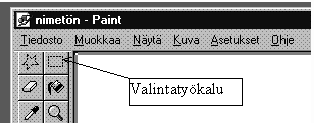
- Select area from your picture that you want to copy into your text. After that
open Edit (finn. Muokkaa)-menu and select Copy
(finn. Kopioi). Now picture is copied on clipboard and it is meant
to move among your text.
- Activate Wordpad-program back on screen. Click that point on text to where
you want your picture located. Then open Edit (finn. Muokkaa)
-menu and select Paste (finn. Liitä) and now
your picture is emerged to the text. Save document pressing again
Save (finn. Tallenna) -button from tool bar (usually the third
button from left).
- Try to double-click the picture and go direct to Paint-program where you can
edit picture. As a matter of fact you can only use tools of Paint in Wordpad. Make some
changes into the picture and go back to word processing program by clicking
any point outside of the picture. Save your text and exit with Wordpad and
Paint.
How to copy files and use Windows Explorer
- Start Windows Explorer (finn. Resurssienhallinta ) and
look what disk drivers and directories (folders) contain. You can see
hard disk´s directory structure on Explorer´s left window and active directory´s
files and folders on right window. You can check contents of folders just
clicking them with mouse on left window. And you can see their contents of directory on right
window. What is the difference between file and directory?!?
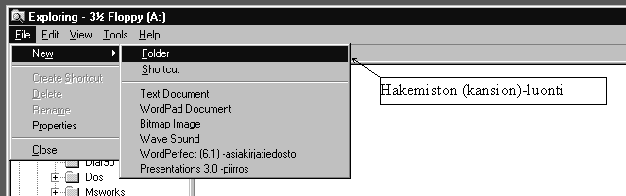
- Create two new directories to your floppy disk ja use names
WINDEMO and TEMP. Double-click A-drive´s icon
(3 ½ Floppy) so that you can see the contents of floppy on right window. You
can create a directory structure like it is demonstrated in picture.
- Copy files from C:\MyTemp\Ownname\ to
TEMP by using left mouse button in Windows Explorer program.
- Copy again files from C:\MyTemp\Ownname\ to
WINDEMO by using right mouse button in Windows Explorer
program. When you use right button do same way as with left button. After
releasing button there will open a menu where it is able to select commands.
Choose Copy (finn. Kopioi).
- Try to copy files from floppy´s A:\TEMP -directory to directory
A:\WINDEMO. What happens? Read emerged window carefully throught!!
You have probably done something wrong if you don´t get any warning messages.
- Change file´s name into another in A:\TEMP-directory by
clicking right mouse button above the file. Changing the name can be done
with command Rename (finn. Nimeä uudelleen). Try to
copy renamed file to A:\WINDEMO -dierctory. What happens now ?
- Remove files that you have created from
C:\MyTemp\Ownname\-directory of hard disk.
- Remove TEMP-directory from your floppy disk with
Windows Explorer-program. Notice that files which have been copied to this directory before
will be removed at the same.
- If you end working log off from computer by selecting Start/Shut
Down/Log off USER ID (finn. Käynnistä/Sammuta/Kirjaa ulos
TUNNUS). Last point on Windows NT is
Close All Programs and log on as a different user?
(finn. Sulje kaikki ohjelmat ja kirjaudu eri käyttäjänä).
IT IS NOT ALLOWED TO SHUT DOWN THE COMPUTER!
Word processing
- Start Wordpad-text editor from menu Start/Programs/Accessories
(finn. Käynnistä/Ohjelmat/Apuohjelmat ).
- Write two text paragraphs. Text can be included for example on your studies
or hobbies. Let the program make linebreaks so don´t press Return-button in the end
of row. Press Return-button in the end of paragraph.
- Save your text to C:\MyTemp\Omanimi-directory. First
open File (finn. Tiedosto)-menu and then select
Save (finn. Tallenna). Browse right directory into
and save the text as Teksti1.doc.
- Try to click your text name on that point where you want to produce changes with
mouse. Remove text with Delete- and Backspace
buttons. Write a little more text.
- Try to write new text upon the old in overwrite-mode space. You can go to
overwrite-mode space by pressing Insert-bar.
After that you can overwrite old text. Back to the
Insert-mode space you can go by pressing Insert
-bar again.
- Save text and use a new name. Open File -menu (finn. Tiedosto)
and select Save as (finn. Tallenna nimellä). Then write
new filename (Teksti2.doc) to field and replace the old one.
Then Save your file (finn. Tallenna)
by pressing.
- Close document by closing the whole program. Choose File/Exit
(finn. Tiedosto/sulje). Usually you can find command
Close (finn. Sulje) from menu and you don´t have to close whole
program. Unfortunately there isn´t that command on Wordpad.
- Open Wordpad again and open document Teksti2.doc.
Open File (finn. Tiedosto)-menu and choose Open (finn. Avaa).
Then choose the right file from File name (fin. Tiedostonimi)-list
by double-clicking.
- Try to change two paragraphs. Select the other as active and move it into
Windows clipboard by using Cut (finn. Leikkaa)-function from
Edit (finn. Muokkaa)-menu. After that click with mouse that point
to where you want to place cutted text-paragraph and use function Paste
(finn. Liitä) from Edit (finn. Muokkaa)-menu.
- Try to copy paragraph to another place. Limit other paragraph active and
copy that to Windows clipboard by using Cut (finn. Leikkaa)-function from
Edit (finn. Muokkaa)-menu. After that click with mouse that point
to where you want to place cutted text-paragraph and use function Paste
(finn. Liitä) from Edit (finn. Muokkaa)-menu.
- Try to delete one paragraph. Select text to active and press Delete-button.
- Oops!!!! If you think that you have deleted text in vain choose
Undo (finn. Kumoa) from Edit (finn. Muokkaa)-menu.
The text which you earlier deleted will return to it´s place.
- Try to select some text in second document´s window (Teksti2.doc)
and copy that to clipboard with command Copy (finn. Kopioi)
from Edit (finn. Muokkaa)-menu. Open new document-window with
function New (finn. Uusi) from File
(finn. Tiedosto)-menu. Now go to new document and open
Edit (finn. Muokkaa)-menu. Choose Paste (finn. Liitä)
and you can paste copied text to new document.
- Next we`ll get to know of program´s helps. Open
Help (finn. Ohje)-menu and choose
Help topics (finn. Ohje aiheesta). Choose from opened window
an interleaf Index (finn. lomake hakemisto) and find instructions about following topics:
Opening documents (finn. asiakirjan avaaminen) and saving
documents (finn. tallentaminen).
- After you have looked up previous instructions get also to know of functions in
other interleafs. When you have learn to use guide´s Find (finn. Etsi)-
function you can close Wordpad.
- Copy your files from C:\MyTemp\Omanimi\-directory to floppy disk
into an appropriate directory. After that delete saved files from C:\MyTemp\Omanimi\-
directory.
- If you end working log off from computer by selecting Start/Shut
Down/Log off USER ID (finn. Käynnistä/Sammuta/Kirjaa ulos
TUNNUS). Last point on Windows NT is
Close All Programs and log on as a different user?
(finn. Sulje kaikki ohjelmat ja kirjaudu eri käyttäjänä)
IT IS NOT ALLOWED TO SHUT DOWN THE COMPUTER!